Netspend
- 4.6
- Rating
- 10.00M
- Installs
- Free
- Price

 Analysis by App-foxy
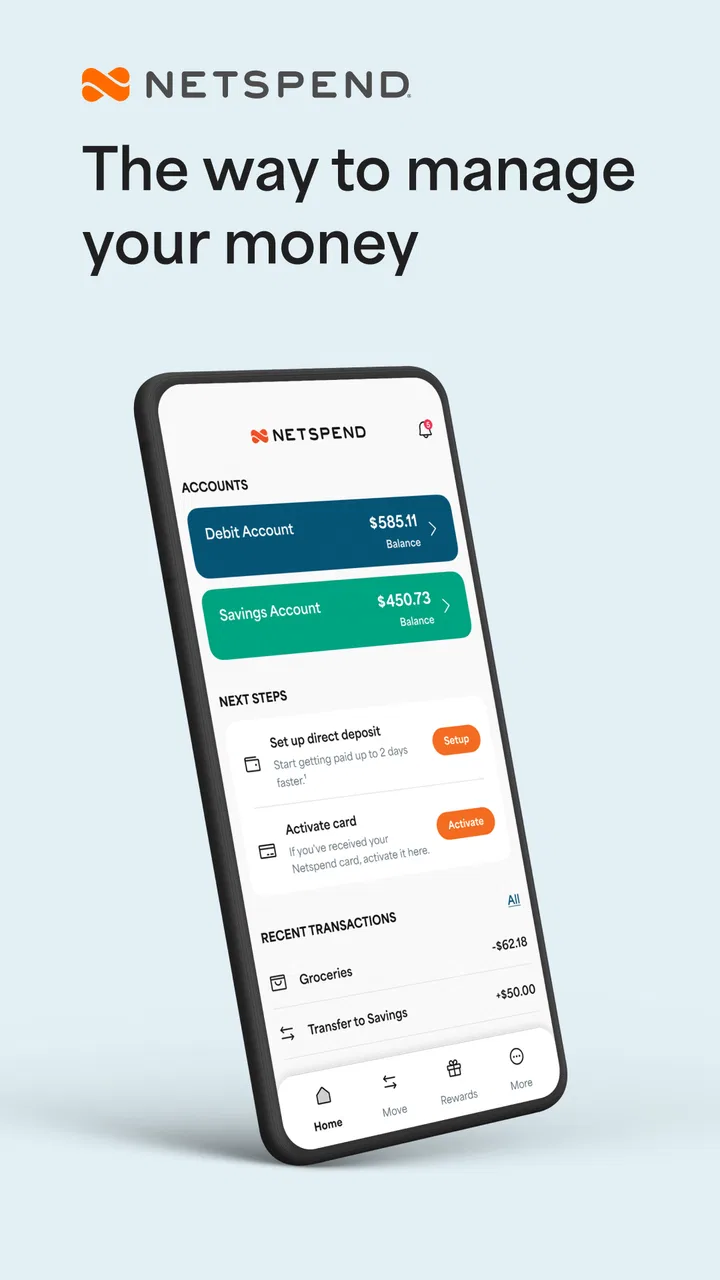
Managing everyday money is rarely difficult because of one complicated task. It is difficult because small decisions keep arriving: checking whether a payment went through, watching a balance before buying groceries, deciding how much cash is safe to spend, and remembering which account should cover the next bill. Netspend is a finance app from NetSpend that aims to make those moments easier to handle from a phone. I found its strongest appeal in that direct, practical role rather than in any sense of financial entertainment.
The app is free to download, carries an Everyone age rating, and has been available since May 23, 2011. That long presence matters to me because a money app needs to feel like a tool I can keep returning to, not something I install once and forget. Its current version is 7.0.5, and it requires iOS 9 or later. The store summary, “Your Money, Your Way,” is brief, but the more useful question is whether the app continues to earn a place in a routine after the first few checks. My answer is generally yes, provided you already have a reason to use Netspend’s financial services.
What Netspend feels like during the first week
My first impression was that this is an access-and-control app rather than a broad personal-finance planner. I would not open it expecting a detailed household budget, investment research, or a replacement for every banking tool. I would open it when I want a closer connection to my Netspend account and need a quick view of what is happening with my money.
You May Also Like

 Pandora - Music & Podcasts
Pandora’s Music Is Easy to Start, but Harder to Recover
Pandora’s strength is its low-effort path from a seed to a station. Its weak spot is how much confidence it asks you to place in connection, setup, and quiet recovery.

 8 Ball Pool
 Is Built on Rivalries, Rematches, and Routine
A close look at the rivalries, rematches, shared routines, and unanswered safety questions that turn a quick pool match into a persistent mobile community.

 Samsung Music
’s Quiet Strength Is Playing What You Already Own
Its reach comes less from spectacle than from dependable access to a personal library. That simplicity is both the app’s strongest retention engine and its ceiling.

 AccuWeather: Weather Radar
AccuWeather Review: A Quick, Clear Forecast for Everyday Decisions
For everyday plans, the best forecast is the one you can understand quickly. AccuWeather makes rain timing, radar, and local conditions easy to act on, with a few trade-offs.

 Hill Climb Racing
Why Hill Climb Racing Still Turns Crashes Into One More Run
A tiny car, a bumpy hill and one more upgrade: Hill Climb Racing keeps resurfacing because its simple chaos makes every near-miss feel personal.

 AliExpress - Shopping App
AliExpress Makes Global Shopping Feel Personal, but Shoppers Bear the Risk
AliExpress turns a global marketplace into a pocket-sized discovery engine. Its reach is useful, its shopping loop compelling, and its trade-offs easy to miss.
More From Our News Desk
View All News


That distinction helps set the right expectations. Many finance apps try to bring together bank accounts, credit cards, bills, spending categories, savings goals, and financial education. Netspend is more focused. Its value comes from reducing the distance between an account and the person using it. If you already use Netspend, having that relationship available on a mobile device is more convenient than treating the account as something you can only manage through a browser or occasional messages.
During the first week, I would use it in short sessions rather than long planning sessions. A quick balance check before leaving a store is a realistic example. Another is checking the account after a payment or transfer so I can make a better decision about the rest of the day. That kind of repeated, low-effort access is where the app makes sense. It turns financial awareness into a small habit instead of a task I postpone until I have time to sit down at a computer.
The app has a 4.6 average from around 167 thousand ratings, with roughly 21 thousand written reviews. Those figures suggest that many users find the basic experience dependable enough to rate positively, although a rating cannot tell me whether the app suits every financial situation. A person who wants only account access may be satisfied, while someone seeking advanced budgeting may judge it against a very different standard.
The right starting point is a specific routine
I recommend starting with one repeatable reason for opening Netspend. For example, check it before a weekly grocery trip, after using the card for an important purchase, or at the end of the day when reviewing recent activity. This is more useful than opening the app randomly and hoping it will somehow improve money habits by itself.
One less obvious benefit of this approach is that it gives the app a clear job. If I use it as a simple checkpoint, I am less likely to confuse a current account view with a complete picture of my finances. That matters because a balance check can help me avoid an awkward purchase decision, but it does not automatically create a spending plan or show whether my overall monthly budget is healthy.
I would also avoid treating the first week as proof that the app has solved everything. Financial apps often feel most useful during the setup period, when I am curious and checking frequently. The real test is whether the app still saves time when the novelty disappears. Netspend passes that early test best for people who need regular access to their Netspend account and prefer handling routine checks on a phone.
Where it fits beside ordinary alternatives
The usual alternative is a mobile banking app from a traditional bank, a browser session, or a paper-and-spreadsheet routine. Compared with a browser, Netspend is more suitable for quick checks because a phone app is naturally easier to reach during the day. Compared with a general budgeting app, it is more direct but less likely to become the central place for a complete financial plan.
That trade-off is important. I would choose Netspend over a separate budgeting tool when the immediate need is account access and routine control. I would choose a dedicated budgeting app, spreadsheet, or broader banking platform when I need to compare several accounts, plan categories in detail, or study longer-term spending patterns. Netspend does not need to win every category to be useful; it needs to make its narrower job reliable.
Why it can remain useful from month to month
After the first month, the app’s value depends less on discovery and more on repetition. I see it as a practical checkpoint that can support a simple financial rhythm: check before spending, review after important activity, and make a short end-of-week assessment. That rhythm is not glamorous, but it is exactly the kind of routine that can prevent avoidable surprises.
A realistic scenario would be a person who uses a Netspend account for planned everyday spending. Before shopping, they check the available balance and decide whether the purchase fits the money they intend to use. Later, they look again to confirm the account reflects the activity they expect. The app does not make the decision for them, but it makes the information easier to reach at the moment when the decision matters.
That workflow also shows a useful limitation: a balance is a snapshot, not a forecast. If I have upcoming bills, pending purchases, or expenses held in another account, I still need my own broader plan. Netspend can support awareness, but I should not mistake frequent checking for complete financial organization. The most responsible way to use it is alongside a clear understanding of my income, commitments, and spending boundaries.
The app has passed the five-million-install mark, which gives it a substantial user base. I take that as evidence that it serves a recognizable need, not as proof that every user will have the same experience. Finance tools are personal. The best app is often the one that matches the account and routine I already use, rather than the one with the longest feature list.
Three habits that make the app more valuable
First, I would use a deliberate “before and after” check for purchases that matter. Looking only after spending can create anxiety, while looking only before spending can leave me unsure about what actually happened. Using both moments turns the app into a simple confirmation tool and helps separate an expected transaction from a mistaken assumption.
Second, I would pair the app with a weekly note outside it. That note could contain only upcoming commitments and a spending limit for the next few days. The reason is practical: Netspend can be the place where I inspect account information, while the note becomes the place where I decide what that information means. Keeping those jobs separate prevents me from expecting a quick account app to function like a full planning system.
Third, I would make the review routine short enough to maintain. A finance app becomes less useful when checking it feels like homework. I would rather spend a minute looking at the account consistently than create an elaborate system I abandon after a week. This is where Netspend’s focused purpose can work in its favor: it is easier to build a habit around a clear, limited action than around an oversized financial dashboard.
The maintenance burden is fairly low, but not invisible
Any money app asks for a little ongoing attention. I need to keep the app updated, remember my sign-in details, and make sure I am reviewing the correct account information before acting on it. The current version is 7.0.5, so keeping the installed version current is a sensible part of normal maintenance. I would not treat an old installation as a reliable basis for judging the present experience.
The larger burden is behavioral rather than technical. Netspend cannot force me to check at useful times, notice an unusual transaction, or maintain a separate budget. If I open it only when I am already worried, it becomes a reaction tool instead of a prevention tool. A small scheduled habit is more effective than repeated emergency checks.
I also think users should decide in advance what information they need from the app. If the goal is a quick balance check, do that and close it. If the goal is reviewing activity, set aside a calmer moment. This avoids a common source of fatigue in finance apps: opening them without a question, scanning quickly, and leaving without making a useful decision.
Where long-term fatigue can appear
The first source of fatigue is repetition without a clear outcome. Seeing a balance again and again can feel reassuring, but if I never connect it to a spending decision, the habit becomes empty. The solution is not necessarily to check more often. It is to decide what action a check should support.
The second is scope. Netspend may be a good home for Netspend-related account access, but I would not want to force it to serve as my only financial organizer if my needs extend across multiple accounts, detailed categories, or long-term planning. A broader banking or budgeting solution may be better for that job. Choosing the right companion tool is more sensible than criticizing a focused app for not being an entirely different product.
The third is the emotional weight of checking money. A useful app can still become tiring if every opening is connected with worry. I would use it to create predictable checkpoints, not to refresh constantly. That balance protects the habit from becoming stressful and makes the app more likely to remain useful over time.
There is also a practical question about who should skip it. I would look elsewhere if I do not use Netspend’s services, if I want a single dashboard for several financial institutions, or if my main goal is detailed budgeting rather than account access. A free download is not automatically a reason to install an app. The right question is whether its focused connection to Netspend solves a problem I actually have.
Who will get the most from it?
I think Netspend is best for existing Netspend users who want convenient mobile access and a straightforward way to stay aware of their account during ordinary spending. It can also suit someone who prefers a simple routine over a feature-heavy financial platform. The app’s broad availability on mobile devices and its Everyone rating make it approachable, but approachability should not be confused with universal suitability.
Families and shared households may still need a separate method for discussing responsibilities, even when one person uses the app for account checks. Likewise, someone trying to repair a complicated budget may need more structure than this app alone provides. In those cases, Netspend can remain a useful account-viewing tool, but it should not be presented as the entire solution.
One question I would ask before installing is: “What will I do differently after opening it?” If the answer is checking whether I can safely make a purchase, confirming recent activity, or keeping a closer eye on a Netspend account, the app has a clear purpose. If the answer is “I want it to organize every part of my financial life,” I would compare it with a more comprehensive alternative first.
Does it earn lasting space?
In my experience, Netspend earns lasting space when it becomes part of a modest, repeatable routine. Its recurring value is not based on novelty. It comes from making a relevant account easier to consult at the exact moments when money decisions happen. That is a durable benefit, especially for someone who would otherwise delay checking or rely on memory.
Its weakness is equally clear: the app’s focused role can feel limited once I want analysis, planning, or a complete view of finances. That is not a reason to dismiss it, but it is a reason to keep expectations realistic. I would rather use Netspend confidently for the job it handles well than turn it into an unsuitable substitute for a budget planner or multi-account dashboard.
Netspend is free, developed by NetSpend, and supported by a large installed audience. Those details make it easy to try, but the lasting decision should come from routine fit. If I use a Netspend account and want quick, regular mobile access, I would recommend keeping the app and building a simple checking habit around it. If I need a wider financial command center, I would pair it with another tool or choose a different primary option.
My final view is favorable but measured: Netspend is most valuable as a dependable everyday checkpoint, not as a complete financial planning system. After the first-week curiosity fades, that focused usefulness can still justify its place on a phone. The key is to use it intentionally, keep the maintenance light, and let a broader plan handle the parts that a focused account app was never meant to replace.
FAQs for Netspend
01What is Netspend and how does it work?
Netspend is a prepaid debit card service that allows users to manage their finances without a traditional bank account. Users can load money onto their card, which can then be used for purchases, bill payments, and ATM withdrawals. The app provides tools for tracking spending, setting budgets, and receiving direct deposits.
02Are there any fees associated with using Netspend?
Yes, Netspend does charge fees for certain services. There may be fees for account maintenance, ATM withdrawals, balance inquiries, and more. It's important to review the fee schedule provided by Netspend to fully understand potential costs and choose the plan that best suits your usage habits.
03Is Netspend safe and secure to use?
Netspend employs multiple security measures to protect user information and funds, including encryption and fraud detection. Users are encouraged to set up alerts and use secure passwords. It's also important to monitor your account regularly to identify any unauthorized transactions promptly.
04Can I use Netspend for direct deposits?
Yes, Netspend allows users to receive direct deposits from various sources, such as paychecks and government benefits. This feature can provide quicker access to funds compared to traditional banking methods. Direct deposits can be set up by providing your Netspend account and routing numbers to the payer.
05What are the main benefits of using Netspend?
Netspend offers conveniences like no credit checks, no minimum balance requirements, and the ability to manage finances through their app. It’s ideal for those who prefer a prepaid option over traditional banking, offering features like budgeting tools, real-time alerts, and cash back rewards.
Pros
- Easy to set up and manage accounts.
- Wide network of reload locations.
- Instant transaction notifications.
- No credit check required to sign up.
- Customizable card design options.
Cons
- Monthly fees can add up quickly.
- Limited customer service hours.
- No interest on account balances.
- ATM fees may apply.
- Not accepted everywhere like major cards.

Netspend
Gallery